wtfile for Mac · now on the Mac App Store
Rename files on your Mac by what’s inside them
wtfile (what’s this file) watches your Downloads folder, reads each new file on your Mac, and gives it a clear name: the date, the company, the kind of document, the amount. Nothing is uploaded and there is no account.
Free for 25 renames. Pro is a one-time purchase, not a subscription. Which version should I get?
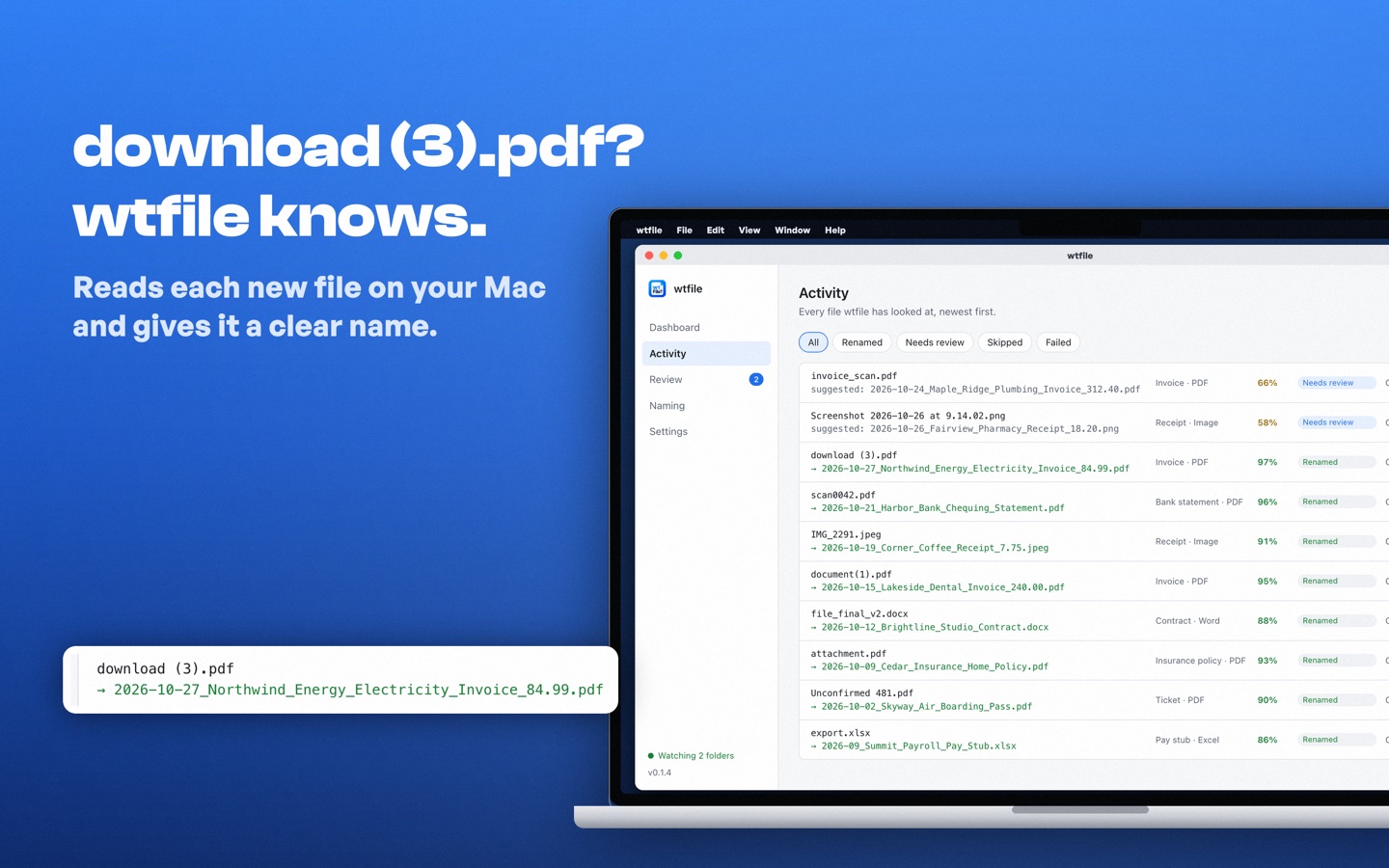
- download (3).pdf2026-10-27_Northwind_Energy_Electricity_Invoice_84.99.pdf
- scan0042.pdf2026-10-21_Harbor_Bank_Chequing_Statement.pdf
- IMG_2291.jpeg2026-10-19_Corner_Coffee_Receipt_7.75.jpeg
The Mac app
Every file wtfile has looked at, with the old name, the new name and how sure it was.
How it works on a Mac
1. Pick a folder
Usually Downloads. wtfile waits until each file has finished downloading, and it never looks outside the folders you choose.
2. It reads the document
PDF, Word, Excel, PowerPoint, text and CSV files, and photos. With Pro, scanned PDFs and screenshots are read with the text recognition built into macOS.
3. It renames, or asks
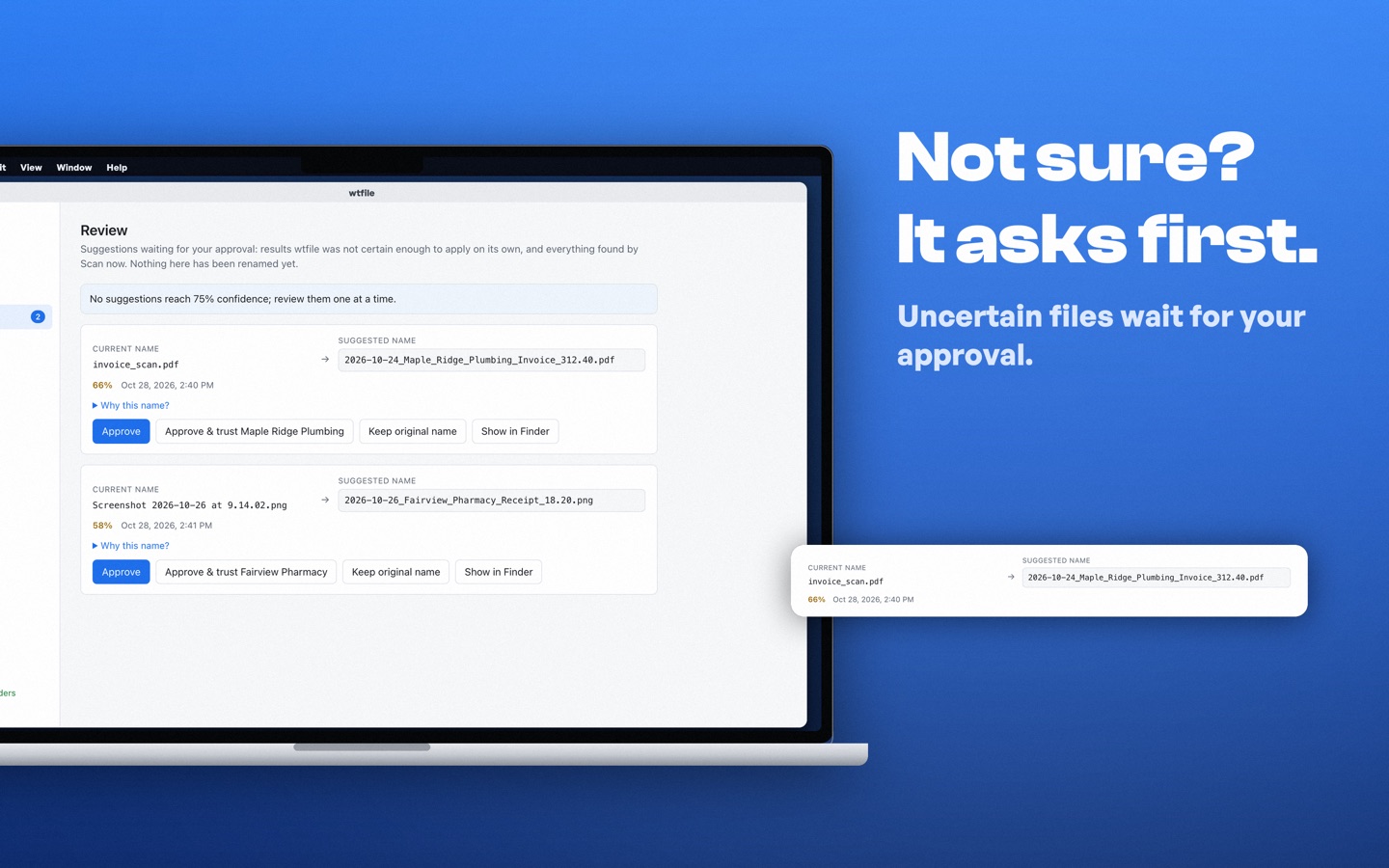
Sure of the answer? The file is renamed in place. Not sure? It waits in Review, with Show in Finder beside it, until you approve.
- Every rename can be undone from Activity, in one click.
- Never overwrites or deletes a file. A name that's taken becomes
Name (2).pdf. - Runs quietly in the menu bar and can start when you log in.
- Apple silicon and Intel. One universal app for both.
- Reads documents in English, French, Spanish, German, Portuguese, Italian, Chinese, Japanese and Korean.
- Folder rules (Pro) can file documents too, e.g.
Invoices/{vendor}/{year}.
Mac App Store or direct download?
Both rename files the same way with the same rules. They differ in how you install, pay and update.
| Mac App Store | Direct download | |
|---|---|---|
| Needs | macOS 13 or later | macOS 11 or later |
| Install | One click in the App Store | Open the .dmg and drag wtfile to Applications. Signed and notarized by Apple. |
| Updates | Through the App Store | wtfile checks once a day and installs signed updates if you allow it |
| Free version | 25 renames, one watched folder | 25 renames, one watched folder |
| Pro | One-time in-app purchase, billed by Apple. Restore purchase unlocks it on your other Macs with the same Apple Account. | One-time purchase here ($39.99). You get a license key for one computer, Mac or Windows. |
| Pro trial on 25 files | No | Yes |
| AI-assistant connector (e.g. Claude Desktop) | No | Yes, with Pro |
| Business 5 and 10 for teams | No | Yes |
| Refunds | Through Apple | 14 days, by email to us |
| Internet use | Never contacts getwtfile.com. Purchases go through Apple. | A daily update check you can turn off, and a license check if you buy Pro |
| Folder access | Apple's App Sandbox: only the folders you choose | Only the folders you choose; macOS asks before wtfile reads Downloads, Documents or Desktop |
Pick the Mac App Store if…
you like Apple handling installs, updates, payment and refunds, and you want Pro on every Mac you sign in to.
Download on the Mac App StorePick the direct download if…
your Mac runs macOS 11 or 12, you want to try Pro on 25 files first, you use an AI assistant with your files, or you're buying for a team.
Direct download (.dmg)Pro bought in one version doesn't carry over to the other, so pick the one you'll keep. On Windows? Download wtfile for Windows.
When it isn't sure, it asks first
A wrong name is worse than no name. Files wtfile can't name with confidence wait in Review with a suggestion you can approve, edit, or turn down to keep the original name.
Your files stay on your Mac
wtfile reads documents on your Mac with rules built into the app, not a cloud AI. There is no account and no telemetry.
- Documents are never uploaded, and document text is never stored: only the details used in the name.
- It works with no internet connection.
- The Mac App Store version runs in Apple's App Sandbox and can only reach the folders you pick.
Questions about wtfile on Mac
Is wtfile on the Mac App Store?
Yes. Search the Mac App Store for wtfile, or use the button on this page. It is free to download, with 25 free renames, and Pro is a one-time in-app purchase.
What is the difference between the Mac App Store version and the direct download?
They rename files the same way. The Mac App Store version needs macOS 13 or later, is installed and updated by the App Store, and sells Pro as a one-time in-app purchase through Apple. The direct download runs on macOS 11 or later, updates itself, uses a license key bought on getwtfile.com, and adds the Pro trial on 25 files, the AI-assistant connector and Business plans for teams.
Can I use a license key from getwtfile.com in the Mac App Store version?
No. The Mac App Store version has no license keys: Pro there is bought through Apple. A key from getwtfile.com works in the direct download for Mac or Windows. Pick the version you plan to keep before buying Pro.
I bought Pro on the Mac App Store. How do I get it on another Mac?
Install wtfile from the Mac App Store on the other Mac, signed in with the same Apple Account, then open Settings → License and choose Restore purchase.
Which Macs does wtfile run on?
Macs with Apple silicon or Intel processors. The Mac App Store version needs macOS 13 or later; the direct download needs macOS 11 or later.
Does wtfile upload my files or use AI?
No. Documents are read on your Mac with rules built into the app. Nothing is sent to a cloud service or an AI model, and there is no account.
Can it rename scanned PDFs and screenshots on a Mac?
Yes, with Pro. wtfile reads scans and images with the text recognition built into macOS, on your Mac. The free version reads files that already contain text, such as most PDFs, Word and Excel files.
Why does macOS ask whether wtfile can access my Downloads folder?
macOS protects Downloads, Documents and Desktop, so the direct download has to ask before reading them. Click Allow for the folder you want watched; wtfile reads nothing else. The Mac App Store version gets access when you choose the folder instead.
How do I get a refund?
For Pro bought on the Mac App Store, request a refund from Apple at reportaproblem.apple.com. For a license bought on getwtfile.com, email support@getwtfile.com within 14 days for a full refund.